
AI can draft a blog post in 90 seconds. But in 2026, speed without strategy creates a problem: generic content that looks like everyone else's, ranks poorly, and wastes your time.
The good news? AI itself isn't the issue. Google has stated clearly that AI-generated content is acceptable when it's helpful to users. The issue is how you use it.
This guide teaches you a responsible AI content workflow that produces original, trustworthy, people-first content--not thin, templated pages that trigger spam filters. You'll get copy-ready checklists, prompt patterns, quality gates, and a publishing workflow that uses ToolPoint SEO and text tools to tighten every piece before it goes live.
Let's build a process you can trust.
What "generic AI content" looks like (and why it stops ranking)
Generic AI content has a fingerprint. You've seen it:
Same headings across competitors: "What is [topic]?" "Benefits of [topic]" "How to use [topic]" "Conclusion"
No examples: Vague claims like "many businesses find success" with zero data, screenshots, or case references
No sources: Statements presented as fact but unsupported by links, studies, or official docs
No experience: Written as if the author has never actually done the thing they're explaining
Swappable prose: If you replaced your brand name with a competitor's, the post would be identical
This pattern fails in 2026 because:
- Search engines prioritize experience and expertise (E-E-A-T: Experience, Expertise, Authoritativeness, Trustworthiness)
- Users bounce fast when content doesn't answer their specific question or offer new insight
- Competitors can publish the same content in 60 seconds, so there's no moat
Callout: If your post could be swapped with any competitor's and no one would notice, it's not defensible. You're competing on speed, not value--and you'll lose.
Use ToolPoint's Word Counter to check post length, but remember: 1,500 words of unique insight beats 3,000 words of filler every time.
What Google actually says about AI content (simple explanation)
Let's cut through the confusion. Here's what Google's official guidance says:
Google allows AI-generated content
From Google's documentation on AI-generated content:
"Appropriate use of AI or automation is not against our guidelines. This means it is not used to generate content primarily to manipulate search rankings, which is against our spam policies."
Translation: AI content is fine if it's helpful to people. Quality and usefulness matter, not the tool you used.
Scaled content abuse is the real risk
Google's Spam Policies define scaled content abuse as:
"Generating many pages with the intent to manipulate search rankings and not help users."
Translation: If you're using AI to publish dozens or hundreds of low-value pages just to capture keywords, that's spam. One well-researched, AI-assisted post? Not spam.
People-first content is the standard
Google's helpful content guidance emphasizes people-first content:
"Content created primarily for people, not to manipulate search engine rankings."
Translation: Write for your reader's real question. If your primary goal is "rank for this keyword" rather than "answer this question better than anyone else," you're off track.
Transparency matters (when it helps users)
Google suggests adding context about content creation methods when it benefits the user. This isn't a legal requirement--it's a trust signal.
Bottom line: AI is a tool. Use it to create genuinely helpful content, cite your sources, and add human expertise. Don't use it to spam the index with thin pages.
Responsible AI use vs risky AI use
Here's a clear breakdown of what works and what triggers risk:
| Behavior | Why it's good/bad | Risk level | Safer alternative |
|---|---|---|---|
| AI for outlining + research synthesis | Helps organize complex topics; human still writes final draft | Low | Keep doing this--add your examples and voice |
| AI for mass-publishing 100+ pages with keyword variations | Classic scaled content abuse; adds no unique value | High | Publish 5 deeply researched posts instead of 100 thin ones |
| AI summarizing research WITH cited sources | Saves time; maintains trust through attribution | Low | Always verify citations are real and relevant |
| AI paraphrasing competitor content without attribution | Plagiarism risk + thin content signal | High | Read competitors for ideas, then write from scratch with original examples |
| AI to edit for clarity, grammar, tone | Improves readability; human judgment still controls content | Low | Use AI as a copy editor, not the author |
| AI inventing statistics or "studies show" claims | Factual inaccuracy; destroys trust | High | Only cite real data; use primary sources or label unknowns |
| AI drafting a tutorial you've personally tested | Fast first draft; human adds real experience and screenshots | Low | Walk through the process yourself, document it, then let AI help structure |
| AI writing medical/legal/financial advice without expert review | YMYL (Your Money Your Life) content requires high E-E-A-T | High | Hire a qualified expert to review or author sensitive content |
| AI creating product comparisons you haven't used | Lacks firsthand experience; feels generic | Medium | Test the products or interview users; add real pros/cons |
| AI generating meta descriptions + social snippets | Low-stakes; human still reviews and tweaks | Low | Generate options with AI, refine with ToolPoint Meta Tag Generator |
Key insight: The risk isn't "did you use AI?"--it's "did you add defensible, original value that serves the user?"
The "Human Value Layer" (the difference-maker)
This is the framework that transforms AI drafts into content Google and users reward.
Every piece you publish should include at least 3 of these 5 elements:
1. Real experience (what you tried, what happened)
Share what you personally tested, built, or learned. Example:
Generic: "Email subject lines should be clear and compelling."
With experience: "I tested 47 subject lines last quarter. The ones with a number + benefit ('5 ways to cut onboarding time by 30%') had 19% higher open rates than generic questions."
2. Original examples (screenshots, code snippets, before/after)
Show, don't just tell. Use ToolPoint Image Resizer to optimize screenshots and Add Watermark to protect proprietary visuals.
Generic: "Use bullet points for readability."
With example: "Here's the same paragraph before and after [screenshot]. Notice how the bulleted version cuts reading time by 40% in heatmap tests."
3. Primary sources (official docs, studies, data)
Link to the origin, not a blog summarizing a blog summarizing a study.
Generic: "Studies show that users prefer fast websites."
With source: "Google's Core Web Vitals research found that pages loading in under 2.5 seconds have 24% lower bounce rates."
Use ToolPoint Page Speed Test to check your own site speed, then reference your real data.
4. Specificity (numbers, steps, constraints)
Replace vague language with precise detail.
Generic: "Optimize your images."
Specific: "Compress images to under 150 KB using WebP format. Test with ToolPoint Image Resizer. This cut my homepage load time from 4.2s to 1.8s."
5. Opinion with reasoning (what you'd do + why)
Take a position. Explain your logic.
Generic: "There are many email marketing tools available."
With opinion: "I'd choose ConvertKit for creators because its automation is visual (easier to debug than code-based flows), and the free tier includes landing pages. Downside: limited A/B testing compared to Mailchimp."
Action step: Before you publish, count how many of these 5 elements appear in your draft. If it's fewer than 3, add them.
The safe AI content workflow for 2026
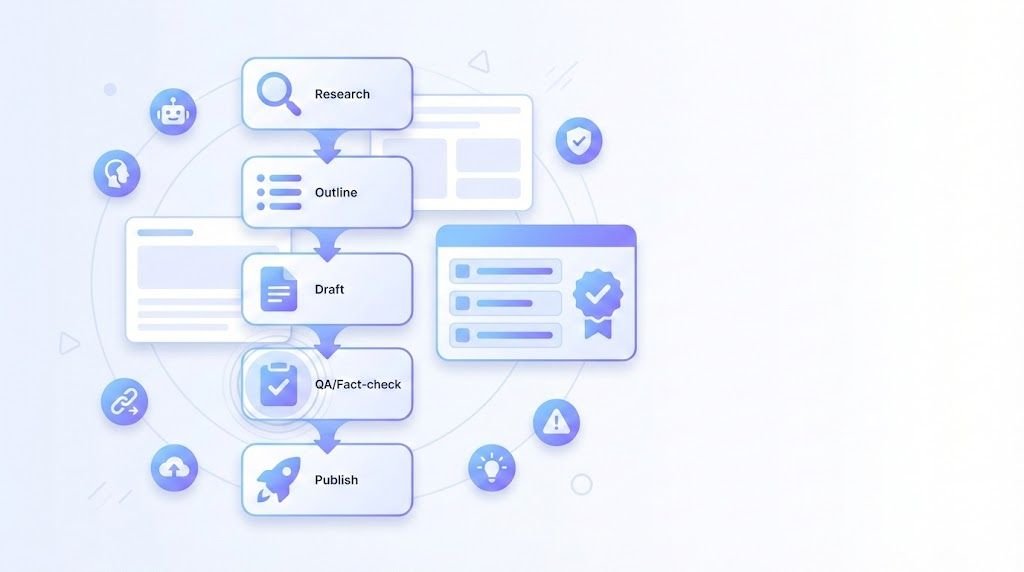
Here's a stage-by-stage process that keeps quality high and risk low:
| Stage | What AI can do | Human must do | ToolPoint step | Output |
|---|---|---|---|---|
| 1. Research | Summarize competitor content, suggest subtopics | Read primary sources; identify gaps competitors missed | Use Keyword Density Checker on top-ranking posts to see keyword patterns | Research brief with sources |
| 2. Outline | Generate section headings and flow | Reorder based on user intent; add unique angles from experience | Check Character Counter for heading length (keep scannable) | Approved outline |
| 3. Draft | Write first draft from outline | Add real examples, screenshots, personal test results, citations | Paste draft into Word Counter to check length vs target | Raw draft |
| 4. Fact-check | Suggest sources for claims | Verify every stat, link, date; remove or label anything unverified | N/A (manual review) | Fact-checked draft |
| 5. Edit for clarity | Tighten sentences, fix grammar | Ensure tone matches brand; cut jargon; add transitions | Use Remove Extra Spaces to clean formatting issues | Polished draft |
| 6. Add human layer | N/A (this is all human) | Insert experience, examples, specificity, opinion, sources (see previous section) | Review with Human Value Layer checklist | Unique, defensible content |
| 7. SEO sanity check | Generate keyword variations | Check keyword density stays natural (aim for 1-2% for primary keyword) | Run Keyword Density Checker to avoid stuffing | SEO-optimized draft |
| 8. Metadata | Generate title + meta description options | Choose best option; customize for CTR | Use Google SERP Simulator to preview, then finalize with Meta Tag Generator + OG Meta Generator | Ready-to-publish metadata |
| 9. Image prep | Suggest alt text | Compress and resize images; add watermark if needed | Use Image Resizer and Add Watermark | Optimized images |
| 10. Voice option | Convert text to audio (AI narration) | Record intro in your own voice for authenticity (optional) | Use Text-to-Speech for drafts; Speech-to-Text to capture voice notes | Multiformat content |
| 11. Final QA | N/A (human judgment) | Run through Quality Gates checklist (see next section) | N/A | Go/No-Go decision |
| 12. Publish + share | Generate social captions | Customize per platform; engage with comments | Use Hashtag Generator and Hashtag Counter for social posts | Live content |
- 1. Research
- 2. Outline
- 3. Draft
- 4. Fact-check
- 5. Edit for clarity
- 6. Add human layer
- 7. SEO sanity check
- 8. Metadata
- 9. Image prep
- 10. Voice option
- 11. Final QA
- 12. Publish + share
Key principle: AI accelerates the boring parts (summarizing, drafting, formatting). Humans own the strategic parts (experience, judgment, trust).
Quality gates: publish / don't publish
Before you hit "publish," run through this checklist. If any answer is "No," fix it or don't publish.
| Quality gate | Check | Publish if... | Don't publish if... |
|---|---|---|---|
| Accuracy | Every claim that matters has a source or real test | You can defend every factual statement with a link, screenshot, or "I tested this on [date]" | You have unsupported "studies show" claims, invented stats, or unverified advice |
| Originality | Includes unique examples, data, or insights not found in top 10 competitors | You've added examples competitors don't have (your tests, customer stories, original research) | It reads like a summary of other articles with no new information |
| Intent match | Answers the query fully (search intent = informational, transactional, navigational, commercial?) | A user searching this keyword would find their answer + next step in your post | The post is tangentially related or stops short of solving the problem |
| Trust signals | Author info + update date + disclosure if AI-assisted + linked sources | Your byline shows expertise, content has a clear last-updated date, and sources are cited | Anonymous authorship, no date, no sources, or undisclosed AI use where transparency helps |
| UX (user experience) | Scannable formatting (headings, tables, bullets), TL;DR, clear internal links, fast load | You've used headings, a TL;DR, ToolPoint tools for formatting checks, and images load fast | Wall of text, no structure, broken links, or slow images |
| E-E-A-T | Demonstrates experience, expertise, authority, or trustworthiness on the topic | You've worked in this field, tested the advice, or interviewed an expert | You're writing outside your expertise without consulting a qualified source |
| Keyword balance | Primary keyword appears naturally; no stuffing | Keyword Density Checker shows 1-2% density for primary keyword | Keyword density exceeds 3%, or keyword appears in every sentence awkwardly |
| Internal linking | Links to related content on your site (2-5 relevant links minimum) | You've linked to related posts, tools, or category pages (e.g., ToolPoint categories) | No internal links, or only external links |
| Call to action | Clear next step for the user | Post ends with "Try [tool]" or "Read next: [related post]" | Post just... ends, with no guidance |
| No spam patterns | Content isn't auto-generated junk (gibberish, keyword salad, doorway pages) | Every sentence makes sense; post has clear value | AI hallucinated nonsense or repeated phrases appear |
Decision rule: If 8+ gates are , publish. If 3+ gates are , revise or kill the post.
Prompt patterns that create original value
Generic prompts create generic content. These patterns push AI to generate useful first drafts you can build on.
| Prompt type | Copy-ready prompt | Why it works | Output |
|---|---|---|---|
| First principles | "Explain [topic] from first principles, assuming I know nothing. Then show how [specific use case] applies." | Forces AI to rebuild logic from scratch, not parrot definitions | Deep explainer with foundational reasoning |
| Comparison with trade-offs | "Compare 3 approaches to [problem]: [Option A], [Option B], [Option C]. For each, list pros, cons, and when you'd choose it." | Creates decision frameworks users can apply to their situation | Practical comparison table |
| Real checklist | "Create a step-by-step checklist for [task]. Include acceptance criteria for each step (what 'done' looks like)." | Produces actionable process docs, not vague advice | Copy-paste checklist |
| Niche examples | "Generate 5 real-world examples of [concept] applied to [niche industry]. Make them specific--include company types, constraints, outcomes." | Prevents generic examples; tailors content to audience | Relatable, industry-specific cases |
| Source + unknowns | "Summarize [topic]. Cite primary sources where possible. If you don't have a source for a claim, label it 'needs verification'." | Builds in fact-checking discipline; prevents hallucinations | Draft with citation gaps flagged |
| Troubleshooting from failures | "Write a troubleshooting section for [task]. Include 5 common mistakes, why they happen, and how to fix them." | Addresses real user pain points; shows experience | Debugging guide |
| Counterintuitive insight | "What's one counterintuitive or commonly misunderstood fact about [topic]? Explain why it's true." | Creates shareable, memorable angles | Unique POV content |
| Template builder | "Create a fill-in-the-blank template for [document type]. Include instructions for each section." | Delivers instant utility; users can copy and customize | Downloadable template |
| Question cascade | "If someone is learning [skill], what are the 10 questions they should ask in order? Answer each briefly." | Structures content around real learning progression | FAQ-style guide |
| "Explain like I'm..." | "Explain [complex topic] like I'm a [specific role: startup founder / teacher / nonprofit director]. Focus on what I'd care about." | Tailors depth and framing to audience expertise level | Persona-specific explainer |
Pro tip: Combine prompts.
Example: "Compare 3 AI writing tools (prompt type 2). For each, create a troubleshooting section (prompt type 6). Cite sources or label unknowns (prompt type 5)."
Test these in your AI tool, then add your experience, examples, and sources before publishing.
Transparency: how to disclose AI assistance (without scaring users)
Google's guidance on AI-generated content suggests being transparent "when it would be expected or helpful for users."
Here are three disclosure templates--choose based on your audience and topic sensitivity:
1. Minimal (low-stakes content like listicles, news summaries)
"This post was drafted with AI assistance and edited for accuracy by [Author Name]."
When to use: Topical content, round-ups, quick how-tos where the process matters less than the outcome.
2. Standard (most blog posts, tutorials, guides)
"AI was used to create the initial outline and draft. All facts were verified, examples are from real tests conducted by [Author/Team], and final content was reviewed and edited by [Author Name] on [date]."
When to use: Informational content where trust and accuracy matter (90% of cases).
3. Detailed (YMYL content: health, finance, legal, safety)
Content creation methodology: This guide was researched using [primary sources]. AI assisted with drafting and organization. All medical claims were reviewed by [Dr. Name, credentials].
Last updated: [date]. Sources listed below."
When to use: Your Money Your Life topics where readers need maximum transparency and expert validation.
Where to place it: Author bio, footer, or intro note. Don't bury it--but don't make it the headline unless it's the story.
Non-scary language: Avoid "generated by AI" (sounds robotic). Use "assisted," "drafted," or "edited with AI support."
A practical "ToolPoint publishing checklist"
Copy this checklist and run through it before every publish:
Pre-draft
- Research complete (primary sources saved)
- Outline approved (includes unique angle)
- Examples planned (screenshots, data, tests)
Drafting
- AI draft created from outline
- Human value layer added (experience, examples, sources, specificity, opinion--at least 3 of 5)
- Every claim fact-checked or labeled "needs verification"
Editing + formatting
- Paste into Word Counter check length vs target
- Run Remove Extra Spaces clean formatting
- Use Character Counter confirm headings are scannable (under 60 chars)
- Check readability (short paragraphs, active voice, clear transitions)
SEO
- Run Keyword Density Checker primary keyword 1-2%, no stuffing
- Preview title + meta with Google SERP Simulator adjust for CTR
- Generate meta tags with Meta Tag Generator
- Generate Open Graph tags with OG Meta Generator
- Add 3-5 internal links (related posts, ToolPoint categories, tools)
Images
- All images compressed + resized with Image Resizer (under 150 KB ideal)
- Watermark added to proprietary images using Add Watermark
- Alt text written for accessibility + SEO
Quality gates (see Table 3)
- Accuracy gate:
- Originality gate:
- Intent match gate:
- Trust signals gate:
- UX gate:
- E-E-A-T gate:
- Keyword balance gate:
- Internal linking gate:
- CTA gate:
- No spam patterns gate:
Publish + promote
- Disclosure added (if applicable)
- Author info + update date visible
- CTA clear ("Try [tool]" or "Read next")
- Generate social snippets with Hashtag Generator
- Check hashtag count with Hashtag Counter (stay under platform limits)
- Post to social, email, or Slack
- (Optional) Convert to audio using Text-to-Speech for accessibility
Post-publish
- Monitor performance (traffic, time on page, bounce rate--use your analytics tool)
- Update if new information emerges (change "Last updated" date)
- Respond to comments and questions
Bookmark this checklist. Print it. Make it a Notion template. Just use it every time.
FAQ
No. Google's official guidance states that AI content is not against their guidelines if it's created to help users, not manipulate rankings. Quality and usefulness matter--not whether you used AI.
Scaled content abuse is defined in Google's Spam Policies as generating many pages primarily to manipulate search rankings without helping users. Example: publishing 500 thin AI articles to capture long-tail keywords. One well-researched AI-assisted post is not scaled abuse.
Apply the Human Value Layer (see section above): add real experience, original examples, primary sources, specificity, and reasoned opinions. If your content could be swapped with a competitor's and no one would notice, it's thin. Use ToolPoint Keyword Density Checker and the Quality Gates checklist before publishing.
Google suggests transparency when it's helpful or expected by users. For most content, a simple disclosure like "AI-assisted drafting, human-edited" in your author bio or footer is enough. For YMYL (health, finance, legal) topics, include detailed methodology and expert review info.
Use prompt patterns that create original value (see Table 4). Ask AI for comparisons with trade-offs, troubleshooting sections, niche examples, and checklists. Then layer in your personal tests, screenshots, data, and opinions. Generic prompts = generic output.
Yes. These are low-stakes, short-form uses where AI saves time. Generate options with AI, then refine them. Use ToolPoint Hashtag Generator for social posts and Meta Tag Generator for page metadata. Always review before publishing.
They're not opposites. People-first content (per Google's helpful content guidance) is created primarily to serve the user's need, not to manipulate rankings. SEO helps that content get found. The issue is when you write only to rank (keyword stuffing, no value) instead of writing to help and optimizing afterward.
Treat it like any content: update when information changes or when performance drops. Add a "
Last updated: [date]" stamp at the top. If you're in a fast-moving niche (tech, policy, finance), review quarterly. For evergreen topics (history, foundational skills), annual reviews are fine.
Not for high-quality content. AI is a drafting and editing assistant, not a replacement for expertise, experience, or judgment. The best results come from AI + human collaboration: AI handles structure and speed, humans add insight and trust. If your goal is to build authority, you need human input.
Verify everything. Use prompts that ask AI to cite sources or flag unknowns (see Table 4). If you spot a claim without a source, either find a real source yourself or cut it. Never publish unverified "studies show" or "research indicates" claims.
- AI content workflow (Table 2) and
- Quality Gates checklist (Table 3) as SOPs. Run spot checks: pick a published post, audit it against the checklist, and review as a team. Create a shared Notion or Google Doc with approved prompts (Table 4) and disclosure templates. Normalize asking, "Did we add the human value layer?"
Only with expert review. For health, finance, legal, or safety topics, AI can draft, but a qualified professional (doctor, lawyer, CPA) must fact-check and approve. Disclose both AI use and expert review. The stakes are too high to skip this step.
Use ToolPoint's suite to tighten, check, and optimize:
- Keyword Density Checker (avoid stuffing)
- Word Counter (target length)
- Google SERP Simulator (preview CTR)
- Meta Tag Generator + OG Meta Generator (metadata)
- Image Resizer (optimize images)
- Remove Extra Spaces (clean formatting)
- Page Speed Test (site performance)
Each tool catches issues that AI drafts alone miss.
Conclusion
AI won't ruin your content--careless AI use will.
In 2026, responsible AI content creation means:
- Use AI as a drafting assistant, not an autopilot
- Add the human value layer every time (experience, examples, sources, specificity, opinion)
- Run quality gates before publishing (see Table 3)
- Stay aligned with Google's principles: helpful, people-first content wins--regardless of how it's made
The workflow in this guide isn't theoretical. It's what works when you want speed and quality.
Start here:
- Tighten your next draft with ToolPoint Word Counter and Keyword Density Checker
- Preview your metadata with Google SERP Simulator before you publish
- Generate clean meta tags using Meta Tag Generator and OG Meta Generator
Explore more tools: Browse ToolPoint categories for SEO, text, image, and social media utilities. Or check out popular tools to see what other creators use most.
AI is just a tool. What you do with it--that's the difference between thin content and content people actually trust.